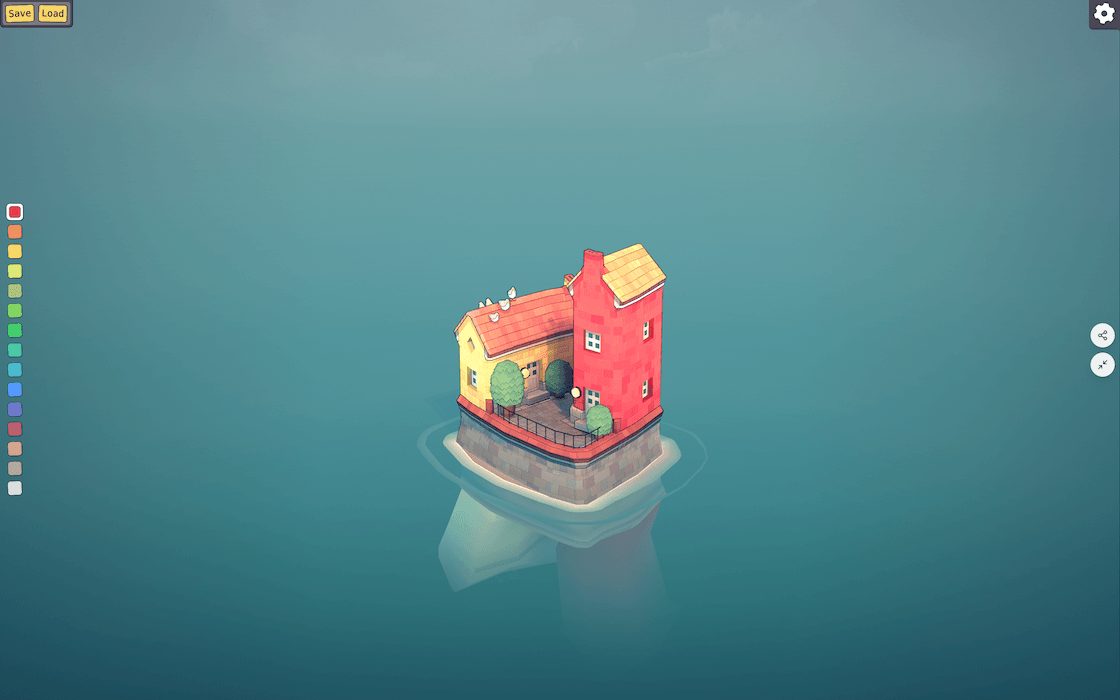
Build a seaside town in your browser
Create colorful island towns block by block. No timers, no pressure, just a calm space to build.
An experimental city building game where you create stunning seaside towns block by block. No goals, no pressure, just pure creative freedom.
What Is Townscaper?
Townscaper is an experimental passion project by Oskar Stålberg, published by Raw Fury. This unique Townscaper Game transforms city building into a meditative creative game where you simply place colorful blocks and watch them become charming towns.
This Townscaper Game has captivated players worldwide, from professional architects using it as a sketching tool to casual gamers seeking relaxation. With availability on Steam, iOS, Android, and Nintendo Switch, anyone can experience the joy of building beautiful towns without pressure or complexity.
No Goals, Pure Creativity
Unlike traditional city builders, Townscaper has no objectives, timers, or resource management. Pick colors from the palette, place blocks on an irregular ocean grid, and watch as sophisticated algorithms automatically transform them into beautiful houses, arches, stairways, bridges, and lush backyards.
Procedural Magic
Townscaper Game uses advanced procedural generation to intelligently create architecture based on your block placement. Build small coastal hamlets, soaring cathedrals, intricate canal networks, or floating sky cities on stilts. Every creation is unique and emerges naturally from your simple inputs.
Why Players Love Townscaper
Experience the perfect blend of simplicity and creativity. Townscaper offers intuitive controls, stunning procedural generation, and endless possibilities for expression.
Intuitive Design
Simple click controls let you place or remove blocks instantly. Choose from a vibrant color palette and watch your vision come to life without complex menus or tools.
Smart Generation
Advanced algorithms automatically create contextual architecture. Blocks become houses, arches, gardens, or towers based on placement and surrounding elements.
Endless Possibilities
Build anything from quaint villages to grand cathedrals. Create Venice-style canals or futuristic floating cities. Your imagination is the only limit.
How to Play Townscaper
Townscaper lets you master the art of town building with simple mechanics that lead to complex and beautiful results. Learn the basics and discover advanced techniques.
Basic Controls
- Building: Select a color and click to place blocks. Stack vertically for taller structures. The game handles all architectural details automatically.
- Editing: Press and hold to drag in any direction to rotate the view and explore your creation from every angle. Adjust the time to craft the perfect lighting and atmosphere.
Building Techniques
- Create Arches: Build two structures with space between, then add a roof block spanning both for automatic archway generation.
- Garden Spaces: Fully enclose an area with buildings. Grass, flowers, and butterflies appear automatically in these courtyards.
- Lighthouses: Stack three or more blocks vertically in different colors. The top block becomes a windowed lighthouse beacon.
- Floating Cities: Form circular patterns to eliminate corners. The game generates propeller-supported structures for sky cities.
- Staircases: Place two buildings on a foundation edge with one space between. Stairs appear automatically in the gap.
Join the Townscaper Community
Townscaper connects you with thousands of creative builders worldwide. Share your towns, discover inspiration, and learn from the community through our unique code sharing system.
Share Your Creations
The Townscaper Game features a built-in sharing system. Save your town to clipboard and share the code with others, or load community creations to explore and modify.
- Save: Open menu, click Save to Clipboard, paste code anywhere.
- Load: Copy a town code, open menu, click Load from Clipboard.
Where to Find Codes
- Steam Community: Browse thousands of shared creations in discussion forums.
- Reddit: Visit r/Townscaper for daily inspiration and community challenges.
- Discord: Join active servers to share tips and collaborate on designs.
- Social Media: Search #Townscaper on Twitter and Instagram for stunning screenshots.
Who Is It For?
- Casual Players: Perfect for stress-free creative sessions without pressure or competition.
- Architects & Designers: An inspiring digital sketchpad for exploring spatial concepts and aesthetics.
- Content Creators: Create stunning, shareable content with beautiful screenshot-worthy towns.
Townscaper FAQs
Everything you need to know about Townscaper, from platforms and pricing to gameplay mechanics and community features.
What Platforms Is Townscaper Available On?
Townscaper is available on Steam for Windows, Mac, and Linux, iOS App Store, Google Play Store, and Nintendo Switch. The game offers the same core experience across all platforms with optimized controls for each device.
How Much Does This Townscaper Game Cost?
Playing Townscaper in your browser on this page is completely free. If you want to own the full game on other platforms, it is priced at $5.99 on Steam and Nintendo Switch, and $4.99 on iOS and Android. All versions are a one-time purchase with no in-app purchases or subscriptions.
Is There a Goal or Objective in the Game?
No, Townscaper has no goals, objectives, or win conditions. It's designed as a creative game rather than a traditional game. There are no timers, scores, resource management, or challenges. You build at your own pace, creating whatever you imagine.
Does Townscaper Support Multiplayer?
Townscaper is a single-player experience. However, the code sharing system allows indirect collaboration where players exchange creations and build upon each other's designs, fostering a vibrant creative community.
Can I Customize Building Types or Styles?
The game uses procedural generation to automatically determine building styles based on block placement. While you can't manually select specific building types, strategic placement, color choices, and configuration influence the architecture, giving you creative control through experimentation.
How Do I Take Screenshots of My Creations?
Townscaper includes camera controls for rotating, zooming, and adjusting time of day. Use your platform's screenshot functionality: F12 on Steam, system shortcuts on mobile, or the Switch's capture button. Perfect lighting settings help create shareable images.
Are There Tutorials or Guides?
The game's simple design means most players learn through experimentation. Basic mechanics like placing and removing blocks are intuitive. Online communities have created extensive guides for advanced techniques like arches, gardens, and floating cities.
Will There Be Future Updates or DLC?
As of the 1.0 release, Townscaper is considered feature complete. Minor bug fixes and platform updates may occur, but no major content additions or paid DLC are planned. The game is designed as a complete, self-contained creative experience.
Start Building Today
Open the game, pick a color, and place your first block. The algorithm takes it from there, turning simple clicks into arches, stairways, and entire seaside neighborhoods. Whether you build for five minutes or an hour, every session leaves you with something worth sharing.